Change Order Template Word Document for Contractors
Protect your payment rights and prevent costly disputes with a properly documented change order.

A change order is a written amendment to an original construction contract, agreed to by both parties, that modifies scope, timeline, price, or some combination of all three. Once signed, it becomes part of the original contract. Change orders affect the overwhelming majority of construction projects, and the average project sees cost increases of 10 to 15 percent from scope changes alone. For a contractor, the change order template is not an administrative nicety. It is a financial instrument, and treating it as anything less is how money disappears.
Why skipping a proper change order puts contractors at legal and financial risk
Verbal agreements feel efficient in the moment and almost always create expensive problems later. Courts can technically enforce a verbal agreement if both parties acted on it, but reconstructing exactly what was agreed, after the relationship has soured, is an exercise in ambiguity that consistently falls harder on the contractor than on the client.
The legal exposure is concrete. Most construction contracts require written notice of a potential change within seven to fourteen days of identifying it. Miss that window, and your claim is invalidated entirely, regardless of how legitimate the work was or how much money you spent performing it. One documented case illustrates the stakes: a contractor lost their payment claim entirely for skipping the written notice requirement in their contract, and the court awarded legal fees to the opposing party on top of the denial. The work was real. The cost was real. None of that mattered because the process failed.
The failure modes that produce disputes are predictable and preventable. Proceeding with work before an approval is signed makes cost control nearly impossible and gives the client a credible argument that the work was unauthorized. Vague scope descriptions leave room for "that's not what I asked for" arguments that are nearly impossible to defeat after the fact. When no schedule impact is documented, time extensions become disputed retrospectively, and the contractor bears the burden of proving a connection that should have been captured in writing weeks earlier. Disagreements over whether a change was owner-directed or a contractor error become intractable when there is no contemporaneous record.
The financial scale of construction disputes has grown substantially. Per Arcadis, the cost of construction disputes in North America rose by over 40 percent in 2023, reaching $42.8 million, the highest value Arcadis had recorded in thirteen years.
There is also a lien rights dimension that contractors frequently overlook. An approved, signed change order protects your right to file a mechanics lien if payment is delayed. Without documentation of the additional work, that leverage does not exist when you need it most. State legislatures are beginning to take notice: California's Private Works Change Order Fair Payment Act, signed into law in October 2025, establishes new payment obligations for change orders on private projects. Contractors in other states should watch that trajectory, because California consistently previews where construction law moves next.
The fields every contractor change order template must include
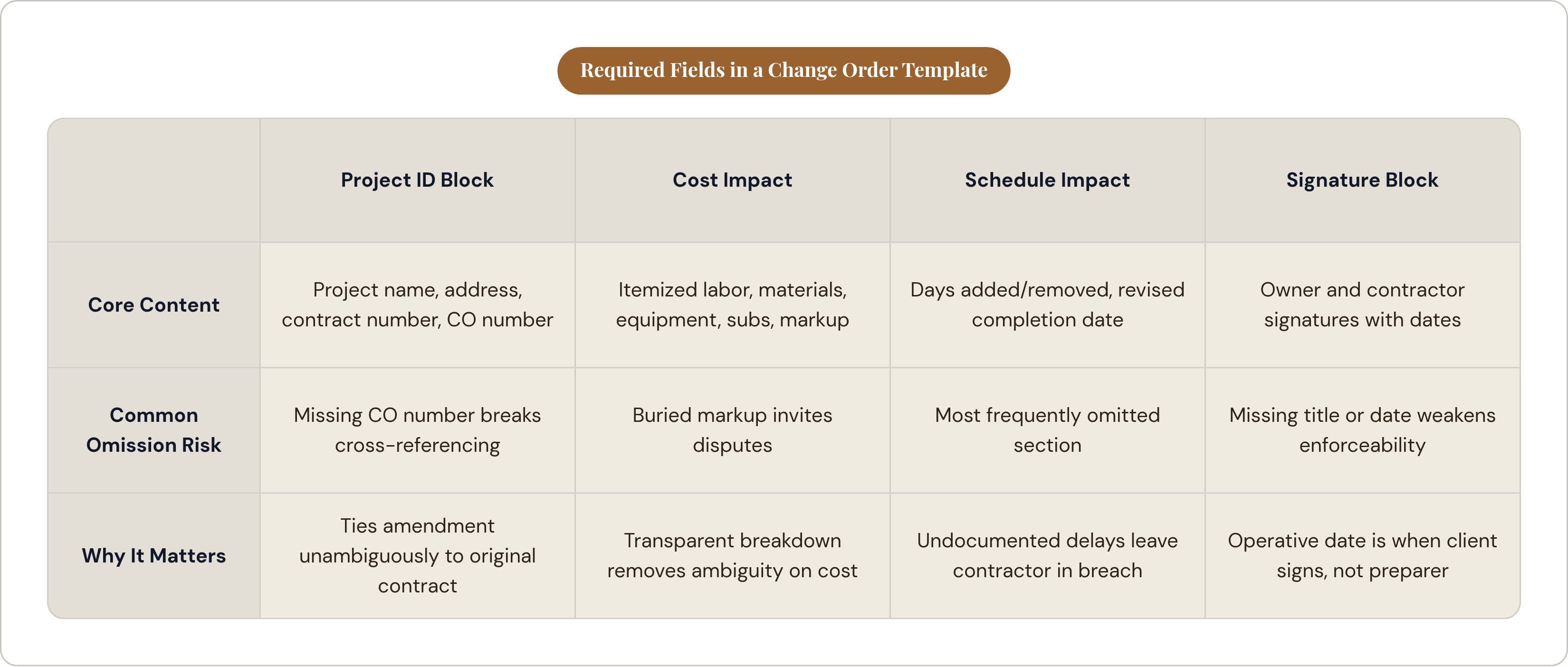
The template is only as useful as its completeness. A form that forces thoroughness produces enforceable documents. A form with too much flexibility produces vague ones.
Project identification block
Every change order must be unambiguously tied to the right contract before anything else appears. That means the project name and physical address, the original contract number and date, the client's name and contact information, the contractor's name, license number, and contact information, and a sequential change order number: CO-001, CO-002, and so on. That sequential number enables cross-referencing across the life of a job and matters enormously if a dispute requires reconstructing the project timeline.
Description of change
This is the most critical field on the form, and it is the one most often written carelessly. The description must articulate the change as observable, measurable work. "Add 120 square feet of concrete patio with a four-inch reinforced slab" is enforceable. "Extend patio" is an argument waiting to happen. Any supporting drawings, requests for information, or specifications that define the scope should be referenced by document name and number directly in this field.
Reason for change
This field establishes who initiated the change and why: client request, unforeseen site condition, design revision, code requirement discovered mid-project. The reason field exists to resolve disputes later about whether the change was owner-directed or a contractor error. That distinction determines who bears the cost, and without contemporaneous documentation, it becomes a matter of competing memory.
Cost impact section
The cost breakdown must be fully itemized. Labor gets listed with hours and rate. Materials appear with quantities and unit costs. Equipment, rentals, and subcontractor costs each get their own lines. Markup must appear as a separate, visible line on the form, stated explicitly. The industry standard ceiling is typically 15 percent combined overhead and profit on change order work, though many institutional contracts, including municipal and university projects, cap total markup at 10 percent, and some contracts break it into separate overhead and profit lines with specific limits on each. The contractor needs to check the specific contract before preparing the change order. Burying markup inside unit pricing invites disputes that a transparent markup line would have foreclosed.
The template should also show the net change to contract value as a distinct line, whether positive for additive changes or negative for deductive ones, followed by the revised total contract value after this change order is incorporated.
Schedule impact section
This section is omitted on more templates than any other, and the omission is costly. The schedule impact section states the number of additional calendar days added or removed by the change, the revised substantial completion date, and a notation on whether the change affects the critical path or can be absorbed within existing float. A client who signs a change order with schedule impact documented has agreed to the new timeline. Without this section, the original completion date remains the contractual reference point, and the contractor is perpetually in breach.
Approval and signature block
The signature block needs lines for both the owner and the contractor, with printed name, title, and a date field for each signatory. The operative date is when the client signs, not when the contractor prepared the form. If the contract requires an architect or project manager to co-approve, that signature line belongs here as well. Per guidance from construction accounting advisors, supporting documentation attached to the change order should include any relevant requests for information, subcontractor bids, labor schedules, revised drawings, and a schedule impact analysis. The template should include an attachments checklist so nothing is overlooked at submission.
How to structure a change order template in Word so it actually gets used
Word is the dominant starting point for small and mid-size contractors. It requires no subscription, every client can open it, and it can be emailed or printed without conversion. The structure of the template within that format determines whether it produces disciplined documentation or lazy ones.
Layout principles
The project identification block goes at the top, always. The sequential change order number belongs in a prominent header position where office staff can see it and file the document immediately. Description and reason fields need enough vertical space to write clearly; cramped fields produce abbreviated, vague entries that fail in disputes. The cost breakdown should be structured as a table with locked column widths: line item, quantity, unit, unit cost, and total. That structure forces itemization instead of a single lump-sum entry, which is both less defensible and less transparent. The markup row must be a separate, visible line in the cost table. The signature block should sit on its own page if the form runs long, so it can be detached and returned without requiring the client to send back the entire document.
Using Word's formatting tools correctly
Lock all instructional text and column headers so field staff can only edit the fill-in sections. Use form fields through the Developer tab for dates and dollar amounts to enforce consistent formatting. Save the master as a.dotx template file rather than a standard.docx so it cannot be accidentally overwritten. For file naming, use a consistent convention: ProjectNameCO-001Date. When a job accumulates multiple change orders across several months, that naming discipline is the difference between a navigable folder and a forensic excavation.
Benchmarking against established standards
The AIA G701 is the benchmark format for change orders on projects governed by AIA contract documents. A custom Word template does not need to replicate the AIA's language, but it should mirror the logical structure: identification, description, cost, schedule, signatures. Owners and architects recognize that flow, and a template that follows it signals professional competence before anyone reads a single line of content. The AIA A201 general conditions reference change orders twenty-three times, conveying exactly how much contractual weight depends on the document's completeness.
The workflow that turns a completed template into an approved, enforceable change order
The template is the vehicle. The workflow is what makes it enforceable.
Identify the change the moment it surfaces. Most contracts allow only seven to fourteen days from identification to written notice. If pricing the change requires time, issue a potential change order or change order request first. This flags the issue formally so the notice clock is documented before final pricing is confirmed. Attach any field photos, requests for information, or preliminary subcontractor quotes gathered during the pricing process.
Get the change order signed before the work starts. This is the single most common failure point across the industry: contractors proceed on verbal agreement, then try to collect once the relationship deteriorates. If a client is verbally agreeable but reluctant to sign, stop. A brief email confirming that you have provided a change order for signature and are awaiting approval creates a contemporaneous record that has real weight if the matter escalates.
At submission, attach every relevant document: the itemized cost breakdown with subcontractor quotes where applicable, any revised drawings, and a schedule impact analysis. Even a one-paragraph note documenting how many days are added and why satisfies the requirement.
Maintain a running change order log for the project. The log tracks each CO by number, description, date submitted, date approved, cost impact, schedule impact, and revised contract total. Per Construction Executive, contractors with formal change order procedures experience 30 percent fewer disputes and faster resolution times. The log is the document you hand over if a dispute proceeds to mediation or litigation.
Once a change order is signed, file it with the original contract immediately. It is now a contract amendment and should be stored with the document it amends.
Pricing a change order correctly, including markup and schedule costs
The itemized cost breakdown is where contractors most reliably leave money on the table, and the failure is almost always one of omission rather than math.
Labor must be priced at the fully burdened rate: wages plus payroll taxes, benefits, and workers' compensation. Materials should be priced from a supplier invoice or a current quote, not a rough estimate. Attach the quote to the change order. Equipment appears as either the rental cost or an established internal rate for owned equipment. Subcontractor costs get listed as their quote, with the general contractor's markup applied to that sub cost as a separate calculation.
On markup: contractors should confirm the cap in their specific contract before preparing the change order. The industry standard ceiling is typically 15 percent combined overhead and profit. Institutional contracts frequently cap the total at 10 percent. Some contracts specify separate caps for overhead and profit respectively. The template's markup line makes this visible to the client and removes any claim of ambiguity.
Schedule costs are a distinct and frequently absent category. If a change adds days to the project schedule, those additional days carry real costs: extended site supervision, continued insurance premiums, trailer or temporary utility rental, project management time. These costs do not appear automatically in a materials-and-labor breakdown and require their own line items in the change order for the change that caused them.
Deductive change orders require the same discipline. Clients will push for the full material savings as the deduction. Contractors must account for restocking fees, work already performed and now being removed from scope, and mobilization costs already incurred before the deduction was requested.
An itemized, transparent change order eliminates the communication failures that drive pricing disputes at the change order stage.
Where a Word template reaches its limits and what contractors use alongside it
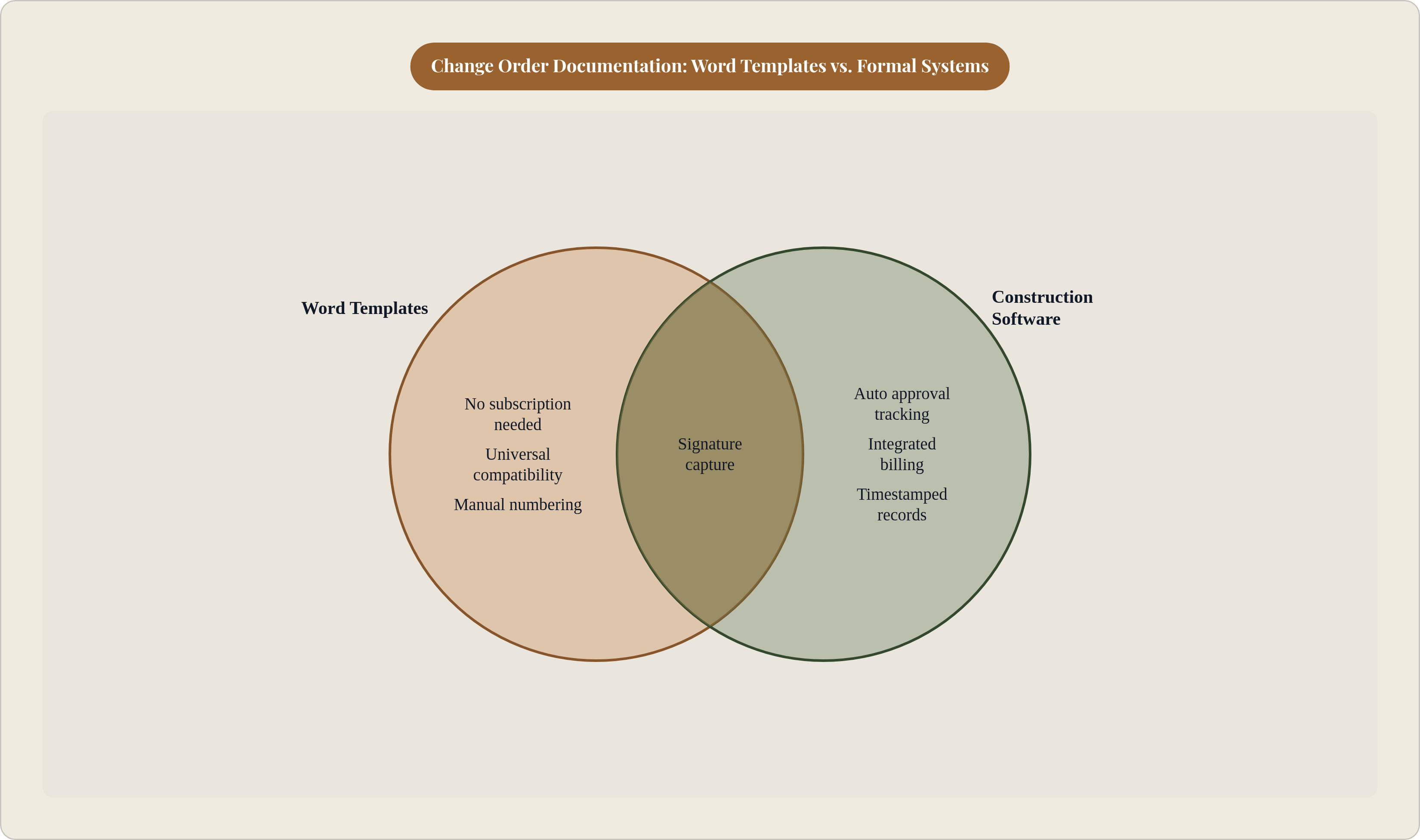
Word templates work well for contractors running a small number of active projects with disciplined manual processes. The ceiling is not the format; it is the process required to sustain it as volume grows.
At higher volume, several specific breakdowns emerge. Word provides no automatic numbering, so managing CO-001 through CO-015 across three concurrent jobs requires a level of manual discipline that is genuinely difficult to maintain under field pressure. There is no built-in approval tracking; a signed PDF sitting in an email thread is not a logged, timestamped approval record. The revised contract total must be recalculated and re-entered by hand with every new change order, which introduces both error and delay. Approved change orders still have to be manually translated into billing, a translation step that creates its own category of mistakes.
Practical supplements extend the Word template's useful life considerably. A shared spreadsheet, whether in Excel or Google Sheets, can serve as the central change order log across all active projects, providing the running totals and status tracking that Word cannot. DocuSign or any comparable electronic signature tool provides timestamped digital signatures that hold up legally and removes the signed-PDF-in-an-email problem. A disciplined cloud storage folder structure, whether in Google Drive, Dropbox, or similar, that keeps signed change orders filed alongside the original contract eliminates the physical filing step as a failure point.
For contractors scaling past a handful of concurrent projects, field service and construction management software can generate, track, and store change orders within the same system as the original estimate, eliminating the manual translation step where compounding errors live.
The underlying discipline transfers to any platform. A contractor who learns to document changes in writing, secure signatures before proceeding, and file every amendment with the original contract has internalized a practice that protects them regardless of what tool they are using. The Word template is often where that discipline is first built.