Free Construction Estimate Template in Word Format
A practical guide to finding and using free Word templates for construction estimates.

Free Word-format construction estimate templates are a rational, legitimate starting point for small hardscaping and remodeling contractors, and the goal here is to help you use them well, understand where they strain, and recognize when you have outgrown them. This is not a pitch for software. It is a practical guide built from the reality of how small contractors actually operate.
Think of a Word estimate template like a sturdy folding table: it gets the job done at the right scale, but you wouldn't serve a wedding reception for two hundred guests on one.
Where to find free Word-format construction estimate templates in 2025
Several reputable sources offer genuinely free downloads with no paywall, no account requirement, and no strings attached.
Smartsheet (updated June 2025) offers one of the most complete free libraries available: residential, commercial, contractor, and remodeling variants, all downloadable in Word, Excel, PDF, and Google Docs. If you are not sure which format fits your situation, Smartsheet is the place to start because the range lets you compare structures side by side.
Mastt.com offers a free template in both Excel and Word, positioned specifically around accurate pricing, bid-winning, and cost control. InvoiceOwl provides a free construction estimate template in MS Word, PDF, Google Docs, and Excel. Template.net offers professionally pre-designed Word templates with an AI prompt-to-template generator if you want fast customization without starting from scratch. Docelf.com gives you a fully adjustable Word template: fonts, colors, currency, tax, discounts, logo, and automatic calculations that reduce manual arithmetic errors. FirstPrintable.com keeps it simple, with clean blank designs suited to contractors who want a minimal, professional starting point and nothing extraneous.
Choosing among them is straightforward if you know your priority. If branding matters most, Template.net and Docelf give you the most control. If you need range across project types, Smartsheet's library is the strongest. If simplicity is the priority, FirstPrintable or InvoiceOwl will get you there fastest.
One format reality worth naming early: Word is best for presentation, and Excel is the working tool. For contractors who are already comfortable with Excel for calculation, the sensible hybrid is to do the math in Excel and present the output in a clean Word document. Many experienced contractors operate exactly this way.
The sections every construction estimate template must include to be usable
A construction estimate that cannot prevent a dispute or reconstruct what was agreed upon is not an estimate; it is a goodwill gesture. Every section below earns its place by doing a specific job.
Project identification block. Client name, site address, project title, estimate date, and a bid or estimate number. Without a number, you cannot track revisions. Without a date, you cannot enforce the validity period.
Scope of work description. What is included, what phases apply, and explicit exclusions and assumptions. This section prevents disputes more than any other. If it is not in the scope, it is not in the price. Write it that way.
Cost breakdown structure. This is the core of the document.
Materials need an itemized list with quantities, unit costs, supplier names where relevant, and line totals. Labor needs hours per task, rates by trade, crew composition, and a total that already reflects burden, meaning payroll taxes, workers' compensation, and benefits loaded into the rate. Equipment gets rental rates, ownership costs, mobilization, and duration as separate fields. Subcontractor costs belong on their own distinct line, not buried inside your labor rows.
Hard and soft cost separation. Hard costs, meaning labor, materials, and equipment, represent the large majority of a typical residential project budget. Soft costs, which include permits, design fees, insurance, and project management time, make up the remainder and are routinely omitted from informal estimates. Omitting them does not make them disappear; it makes them come out of your margin.
Overhead and profit markup. A separate line, not hidden inside unit costs. Transparency here builds trust and protects your margin.
Contingency allowance. Sized to project risk. A well-scoped, straightforward patio replacement warrants a tighter contingency. An early-stage outdoor living build with drainage, lighting, and unfamiliar site conditions warrants a larger one. Ten to twenty percent of total project cost is a sensible range depending on complexity.
Validity period. When the estimate expires. Given current materials conditions, this is not optional language. The next section covers why.
License number disclosure. Required on bids and estimates in several states, including Arizona, Florida, Oregon, and California, which mandates it on all contracts and proposals. Including it costs nothing and protects you. Leaving it out in a state that requires it is an unnecessary exposure.
What many free templates omit entirely: exclusions language, escalation clauses, and a basis-of-estimate statement explaining the assumptions behind the numbers. Add these manually. The template is the structure; your expertise fills the substance.
Why estimate validity periods are a real risk right now and how to set them
Construction materials prices rose sharply year over year through June 2026. An estimate with no expiration date is a contractor silently absorbing that risk. The client pays last year's price; you cover the difference.
The tariff environment since mid-2025 has made this materially worse. Section 232 tariffs on steel and aluminum reached 50% in June 2025. Timber and lumber picked up a 10% tariff in October 2025. Kitchen cabinets and vanities were hit at 25% in October 2025, rising to 50% on January 1, 2026. The NAHB/Wells Fargo builder survey in April 2025 put the typical tariff cost effect at $10,900 per home, up from $9,200 just the month before.
For most fixed-price residential hardscaping or remodeling estimates, 15 to 30 days is a sensible maximum validity window. For steel-heavy scopes, consider as short as one week. For work that will not start for 60 to 90 days or more, add an escalation clause tied to an objective materials price index, with a defined threshold before adjustment triggers. Five to ten percent movement is a typical trigger.
The language itself is simple. Something like: "This estimate is valid for [X] days from the date above. Material pricing is subject to change; work commencing beyond this window requires revised pricing." Put it in the template now. It is text, not a formula, so Word handles it just as well as any software tool.
How overhead, markup, and profit fit into a professional estimate
Many small contractors fold overhead into labor rates invisibly, or confuse markup with margin, or apply a single percentage once and call it done. All three habits obscure whether a job is actually profitable.
General conditions, which include site supervision, temporary facilities, insurance, mobilization, and similar costs, should appear as a separate line item, not absorbed into your direct cost rates. When they are invisible, they evaporate the moment a job runs longer than planned.
The proper markup structure applies overhead as a percentage to total direct costs, then applies profit on top of that. These are not the same number applied once. Overhead recovers your cost of being in business; profit is the return on risk and capital you are assuming by taking the job. Conflating them is how contractors stay busy and break even.
The logic holds at any project scale: direct costs plus general conditions produce a subtotal; overhead markup and profit markup applied to that subtotal produce the bid price. Your template should have labeled rows for each category. Do not make the client guess what is in the number; that ambiguity is where disputes originate.
Pricing discipline also matters beyond the math. Jobber's Q4 2025 data showed that home service revenue growth was sustained by higher invoice values and a deliberate shift toward higher-value work. Disciplined pricing outperformed volume in a softer demand environment. Getting the markup structure right is more durable than simply chasing more jobs.
Matching the estimate format to the project phase and client situation
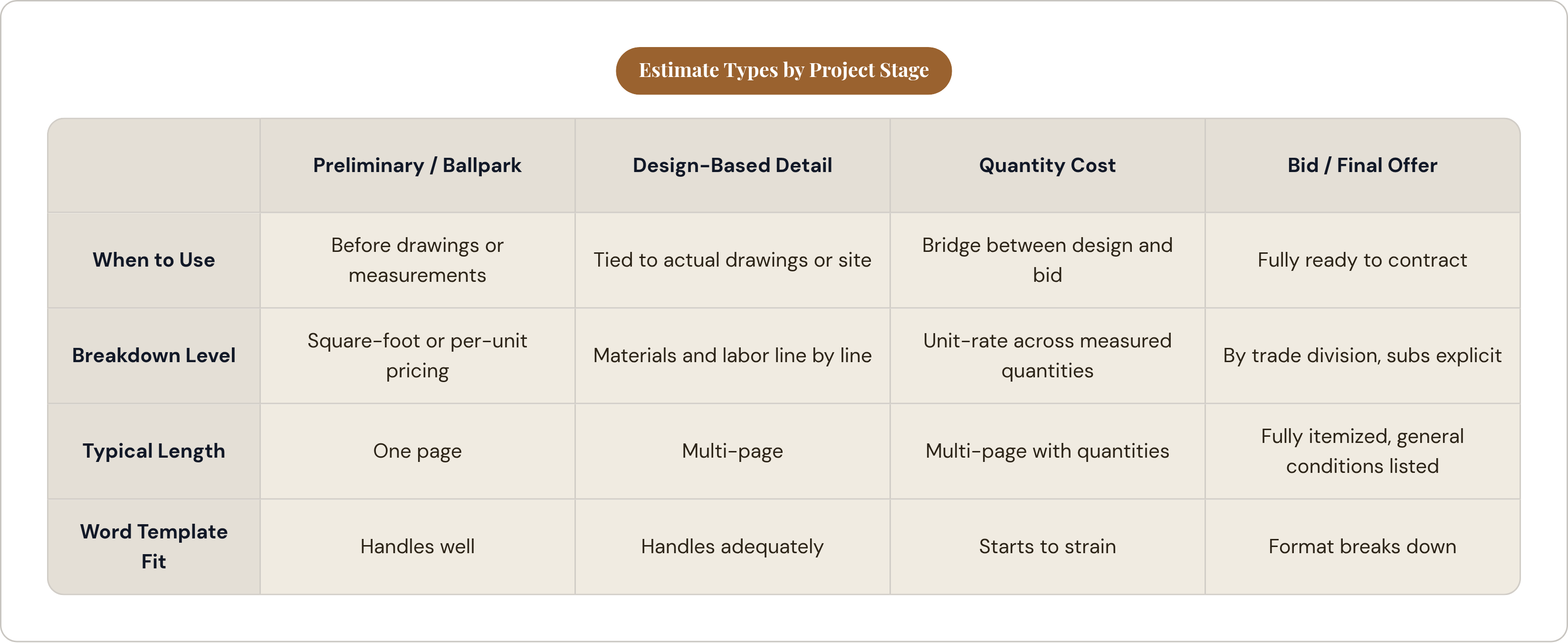
Not every estimate needs the same structure. The right format depends on where you are in the project conversation and what the client actually needs to see.
Four types of estimates map to four different stages. A preliminary or ballpark estimate uses square-foot or per-unit pricing, fits on one page, and is appropriate for an initial client conversation before drawings or measurements exist. A detailed, design-based estimate breaks down materials and labor line by line, tied to actual drawings or site measurements. A quantity cost estimate applies unit-rate calculations across measured quantities; this is the bridge between design and final bid. A bid or final offer is fully itemized by trade division, with subcontract breakdowns explicit and general conditions listed separately.
A Word template handles the first type well and the second adequately. Beyond that, the format starts to strain, and the next section explains why.
For hardscaping specifically: a patio or retaining wall estimate at the preliminary stage is a clean, single-page Word document with square-foot pricing. A full outdoor living build with drainage, lighting, and a pergola warrants a detailed breakdown. Use the format that matches the stage, not the one that is easiest to produce.
The client-facing versus working-document distinction matters here too. What the client sees should be Word or PDF: clean, branded, easy to read. Your internal math belongs in Excel or estimating software. Producing a clean Word summary backed by an itemized Excel file signals professionalism without overwhelming the client with rows they do not need to see. On any job large enough that a client wants to audit the detail, having both ready is the right answer.
The practical limits of a Word template as job volume and complexity grow
Word templates work until they do not. The failure modes are specific and predictable, so there is no reason to be surprised by them.
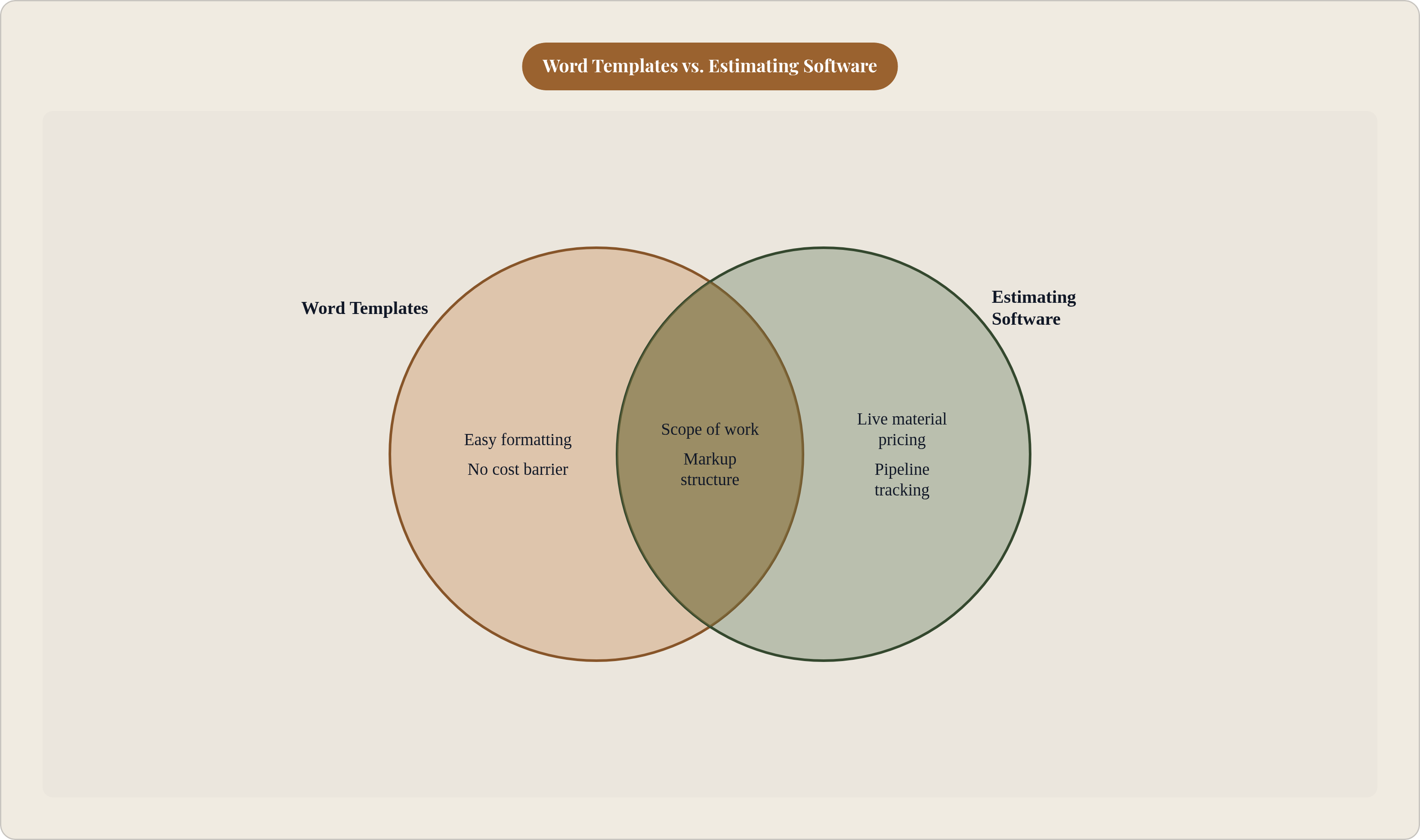
There is no automatic recalculation. Change a material quantity and every downstream total must be updated by hand. There is no version control, so when a dispute arises about what the client approved, you are reconstructing it from memory and saved file names. There is no material price database; unit costs are whatever you type in, with no live pricing and no supplier integration. There is no audit trail and no status tracking: no visibility into which estimates are open, which are accepted, which have expired, and which were lost.
The break-even point, according to CFMA's 2025 data, sits around 15 to 20 estimates per month. Below that threshold, the time cost of managing templates manually is manageable. Above it, the manual process reliably costs more in labor time than dedicated software would.
There is also margin leakage to account for. CFMA data points to template-related estimating errors contributing meaningfully to revenue loss, in the range of 2 to 4 percent annually. That is not just lost time; it is margin disappearing on every affected job.
The market context makes this more consequential, not less. The home services sector was growing at 7 to 10 percent annually as of 2025, and 278,000 new home service businesses opened in the United States in 2023. More competition means more estimates, more price pressure, and less room for arithmetic errors to be absorbed quietly. The Associated General Contractors data showing 82% of U.S. construction firms struggling to fill hourly craft positions compounds the problem further. In a tight labor market, an estimate with wrong labor hour assumptions is not a rounding error; it is a real cost you will pay in the field.
What estimating looks like when software and AI handle the mechanical work
The core shift is from a document you fill in to a system that populates costs from a database, tracks revisions automatically, and follows up on open estimates without requiring you to remember to do it.
AI estimating tools now handle the parts of quoting that consume the most time: formatting, arithmetic, and version management. Per 2025 category data, contractors using these tools save meaningfully on quoting time each month, hours currently spent on work that produces no billable output.
Speed to response matters for close rate. Homeowners frequently choose the first contractor to respond. A manual estimate workflow that takes several days to produce and send leaves money on the table in a market where, per 2025 data, 88% of high-performing home service businesses already use AI tools versus just 27% of lower-confidence peers.
A unified estimating system handles things a Word template structurally cannot: live material pricing tied to supplier data, automatic follow-up on unaccepted estimates, estimate-to-invoice conversion without re-entering any data, and full sales pipeline visibility across all open bids.
For hardscaping and remodeling contractors specifically, mockup and design tools integrated with quoting give clients a visual before the estimate is finalized. That capability wins jobs against competitors who are still emailing Word documents. Templates have a ceiling. Knowing where that ceiling is determines when to move, and moving at the right time is the decision that compounds.