Crew Scheduling and Jobsite Overlap for Multi-Project Weeks
Plan crew placement by phase, not by feel.

Multi-project weeks fail in the same spot almost every time: Monday morning, when someone decides who goes where based on gut feel instead of a plan. Hardscaping work is sequential and site-specific by nature, but jobs don't line up one at a time to wait their turn. They stack up, and when a contractor makes ad hoc calls about crew placement at 6am on Monday, those small decisions compound into real delays by Thursday.
The labor math makes this worse than it looks. According to AGC's Workforce Survey, 45% of construction firms reported a worker shortage caused at least one project delay. Crews are already stretched thin, so a scheduling mistake doesn't just cost an afternoon, it costs a slot that can't be easily refilled.
A crew scheduling failure pattern in hardscape work is when a crew gets sent to a site for a prep phase that isn't actually ready. A crew gets sent to a site for a prep phase that isn't actually ready, materials aren't there, or the prior work never got finished. Two active projects hit their most labor-heavy phase on the same day, and there's only one crew to cover both. A job runs long with no buffer built in, so the next site starts late and nobody tells the homeowner. Equipment like a plate compactor or skid steer gets double-booked across two sites that both needed it at 8am.
None of these are minor scheduling hiccups. Each one eats into margin, wears down the crew, and chips away at the homeowner's trust in the middle of a project where their yard is torn up and they're watching. Fixing this takes a deliberate system, not better guessing. The rest of this piece builds that system, piece by piece.
How hardscaping project phases create hard scheduling dependencies
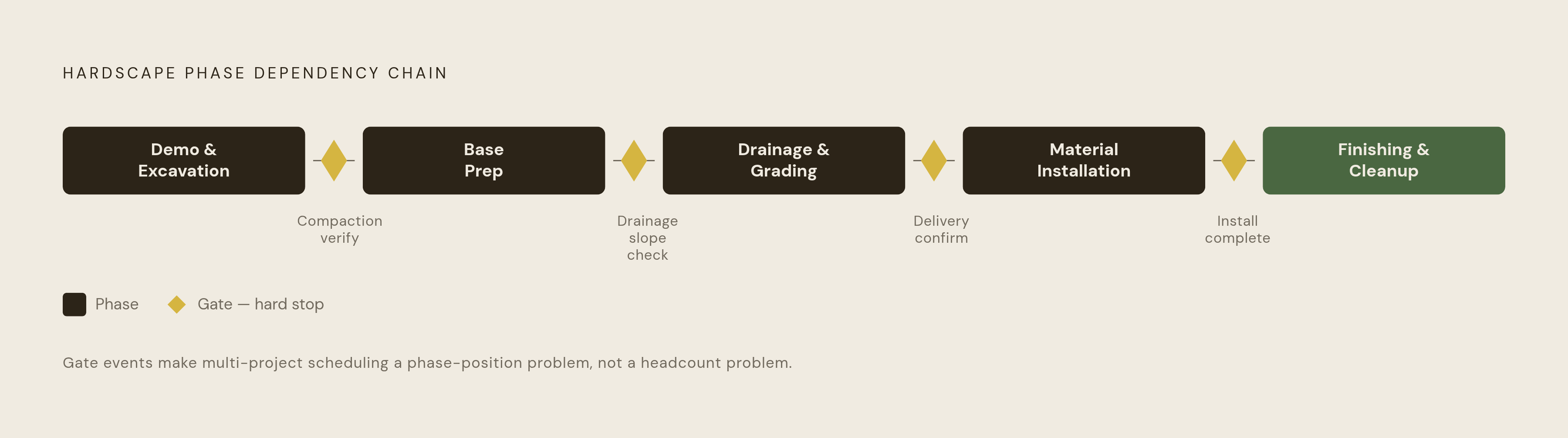
Every hardscape job moves through the same fixed sequence: demo and excavation, base prep, drainage and grading, material installation, then finishing and cleanup. Each phase depends on the one before it finishing correctly. Pavers can't go down on a base that hasn't been compacted. Edging can't get finished before the installation itself is done. There's no shortcut around the order.
That means scheduling across multiple jobs is really a phase-position problem. It's a phase-position problem. The real question for any given day isn't "how many people do we have," it's "which phase is each project sitting in right now."
Two projects in the same phase at the same time means full competition for the same crew. Two projects in different phases can sometimes split a crew, but only if the boundary between those phases is clean, with one task genuinely done before the crew leaves. Pulling a crew off a job that's mid-phase is the worst spot to be in. Leaving an uncompacted base sitting over a weekend isn't just a delay, it's a quality risk and, depending on weather, a liability risk too.
Construction scheduling research from xshift.ai notes that certain phases in general building construction become especially scheduling-intensive when multiple trades are working in the same physical space at once. Hardscape has its own version of that: base prep and drainage. Grading, compaction, and drainage work all compete for the same ground at the same time, and getting the order wrong means redoing work.
Hardscape also has its own version of an inspection hold point, even without a building inspector involved. Compaction verification, drainage slope checks, and material delivery confirmation all function as gate events. Until one clears, the next phase doesn't start. Before the week even begins, every active project needs its phase position mapped. Headcount alone tells a contractor almost nothing useful.
Mapping your crew capacity before the week begins
Capacity is available skilled hours, by role, across the days of the week. It's available skilled hours, by role, across the days of the week. A contractor with 12 people on payroll might have far less real capacity than that number suggests once roles, equipment, and drive times get factored in.
A few specific things need mapping before Monday:
- Lead crew versus laborers: they're not interchangeable when a phase requires judgment calls, like reading a drainage slope or checking base compaction by feel.
- Equipment availability: is the compactor tied to job A all day, or can it move to job B by 1pm?
- Drive time between sites: two jobs 45 minutes apart don't combine the way two jobs across town from each other do.
- Partial-day moves: can a crew actually shift mid-day without losing more time in transition than it saves?
The pattern is familiar across mid-market contractors running dozens of crews: once a scheduling system outgrows a whiteboard and nobody's replaced it yet, jobs fall through the cracks the moment something changes and the board doesn't reflect it.
A real capacity map, in practice, covers four things: every active project and its current phase, every crew member's confirmed availability by day, any equipment tied to a fixed site, and which projects can run on a partial crew versus which need everyone. Once that's on paper, or on a screen, there's an honest picture of deployable labor before a single commitment gets made for the week. That picture is the raw material for the sequencing decisions that follow.
Sequencing logic for assigning crews across multiple active jobs
Once capacity is mapped, sequencing decides who goes where and in what order. The first rule is phase-criticality. Whatever project becomes unrecoverable if it slips, a scheduled concrete pour, a material delivery window that won't repeat, gets the crew first, regardless of how big or small that job is compared to the others.
The second rule is dependency-clearing. Between two jobs that both need attention today, the tiebreaker is: which one, if finished today, opens up the most work tomorrow? Assign toward that one.
Construction scheduling research from Homebase and joinhomebase.com describes a method called Last Planner, where the people closest to the actual work make the weekly commitments, and blockers get cleared before work starts rather than discovered after the crew's already stuck. Applied to hardscape, that means the lead on each site confirms phase readiness before the crew is dispatched.
Splitting a crew across two jobs works in some situations and backfires in others. It works when one crew is wrapping up cleanup at site A while another starts excavation at a fresh site, since those are independent tasks needing different skills. It doesn't work when two people get pulled off a paver installation mid-course to go start prep somewhere else. What's left behind is too thin to hold pace, quality drops, and both jobs end up stalled instead of one job finishing clean. The rule of thumb: only split a crew when both resulting groups can function independently on their assigned phase, not when one group is really just short-staffed cover.
Xshift.ai's research on multi-building projects notes that crews can pour foundations on one building while framing another, since the two tasks don't physically collide. Hardscape has the same logic: run base prep on one job while doing final installation on another site that's further along. The output of all this sequencing work needs to be written down, day by day: who, which site, which phase, and what has to be true before that crew shows up. A mental map doesn't survive a Tuesday with rain in the forecast.
Building buffer time into the weekly plan
Buffer is a reserved window built into the schedule specifically to absorb the disruptions that show up on almost every job, sooner or later. It's a reserved window built into the schedule specifically to absorb the disruptions that occur on almost every job, sooner or later.
Hardscape work has a short list of usual suspects. Rain doesn't just cost a day, it can force a full re-compaction of wet base material before the next phase can even start. Material deliveries for pavers, aggregate, or polymeric sand run late more often than estimates assume. Digging into a site turns up buried debris, an unmarked utility line, or a drainage issue nobody could see from the surface. And phase estimates run long, a base prep budgeted at one day stretches into a day and a half because the soil didn't compact the way it looked like it would.
Buffer needs a specific place in the weekly plan.
- Leave a real transition gap between when a crew is expected to finish at site A and when they're expected at site B. Zero margin back-to-back is asking for a late start somewhere.
- Don't schedule the same crew to start a brand-new job the same day they're wrapping another. That transition day is buffer, labeled that way or not.
- Hold a half-day or full day late in the week open, rather than pre-filling it with a new commitment at the start of the week.
None of this is lost revenue sitting idle. An open recovery day is exactly where punch-list items, material runs, and estimate site visits happen, work that was getting squeezed out anyway whenever a job ran long with no margin to absorb it. Without buffer, a single job running three hours over cascades fast: site B sits with a crew waiting around, and a homeowner who expected someone at 9am doesn't see a truck until noon. That kind of trust damage moves faster than the actual hours lost.
Communicating schedule changes to crews and homeowners in real time
Two communication channels carry all the weight here, crew-to-office and office-to-homeowner, and they carry different content at different urgency levels. Mixing them up, or letting either one lag, is where a schedule that looked fine on paper falls apart in practice.
On the crew-to-office side, the field needs a fast way to flag a phase-readiness problem before the crew gets dispatched, not after they've already driven out and found the site isn't ready. A quick 7am text to the lead asking "is the area ready?" saves more time than sending the whole crew out to discover the answer in person.
On the office-to-homeowner side, hardscape clients are usually home, or at least keeping an eye on the property, during the project. An unannounced late start or a postponed day, delivered with no warning, lands badly at exactly the moment their yard is dug up and they've got no visibility into what's happening.
The Best Crew Scheduling Software in 2026 source includes a case from a solar job: a service call expected to run 20 minutes turned into three hours, nobody told the office, and the next crew on the schedule sat waiting on a job that couldn't even start yet. By the time anyone noticed, the rest of the day's plan was already wrong. That's the exact scenario real-time communication is built to catch before it snowballs.
In practice, that infrastructure looks like: schedule changes pushed straight to crew phones the moment they happen, rather than relying on someone to manually forward a group text. Crew leads confirming arrival and phase-start through a mobile check-in, so the office actually knows a job is running rather than assuming it is. And a homeowner notification that fires automatically when a delay happens, a templated message rather than a phone call scrambled together for every single change. Xshift.ai's research names real-time updates and mobile access, so field crews and office staff stay aligned no matter which site they're on, as the core capability separating scheduling tools that actually help from ones that just look good in a sales demo. That's infrastructure, not an extra feature to consider later.
What software can and cannot do for multi-site crew management
Software should serve a scheduling system that already works, not substitute for one that doesn't exist. A contractor without any sequencing discipline won't fix that by buying an app, no matter how good the app is.
Homebase's construction scheduling guide breaks the space into distinct lanes. Project scheduling covers master timelines, dependencies, and milestones, and matters most to larger hardscape operations running several multi-week projects at once. Field planning turns that master schedule into an executable weekly plan, the Last Planner layer described earlier. Crew scheduling covers who's at which site, who's available, and how scheduled hours compare to actual hours worked, and that's the lane that matters most for the typical hardscape operation.
A few named tools cover different pieces of coordinating crews across multiple active projects.
Workyard, starting around $6 per user per month plus a $50 monthly base fee (scheduling features require the Pro plan), ties GPS-verified time tracking directly to crew-to-job scheduling. Drag-and-drop reassignments push to crew phones instantly, and a live crew map supports proximity-based dispatch. It fits contractors who need to confirm crews are actually on the right site and want hours tied cleanly to job costing.
Buildertrend, priced on a custom basis, gets named by Homebase's guide as a strong fit for crew scheduling among residential builders and smaller general contractors. It connects with QuickBooks and Xero and sits inside a broader job management workflow, including a client portal, so it suits contractors who want crew scheduling wrapped into a larger project management setup.
Fieldwire offers a free Basic tier, with paid plans starting around $39 per user per month billed annually. Jobber's guide describes it as strong for coordinating tasks and tracking progress across a project, but it's built for task-level coordination rather than whole-crew dispatch.
Jobber starts around $29 a month annually for one user, with a Plus plan around $529 a month, and GPS tracking available on higher tiers. Workyard's own guide describes it as the strongest fit when the work is service calls, leaning more toward single-visit scheduling than the multi-day site sequencing hardscape crews actually need.
Procore, custom-priced, suits mid-to-large general contractors managing complicated dependencies and master timelines, and Homebase names it as the strongest pick for the project scheduling lane specifically. For most hardscape contractors, it's likely more tool than the job calls for, unless the portfolio includes commercial or large-scale residential work.
Connecteam runs free for up to 10 users, then starts around $29 a month for up to 30 users. Workyard's roundup frames it as the right fit when broad crew communication matters as much as scheduling itself, useful for smaller crews where team messaging carries a lot of the coordination load.
Assignar, quote-based, stands out in Workyard's roundup for putting crews and equipment on the same scheduling board. That matters for hardscape contractors juggling compactors and skid steers alongside labor, where equipment conflicts are just as common as crew conflicts.
HCSS Dispatcher, also quote-based, works as a magnet board covering crews, equipment, and rentals, with a map view for proximity-based reassignment. It's built more for heavier civil construction, but worth a look for hardscape operations running a sizable equipment fleet alongside crews.
No software fixes a crew double-booked at two sites when nobody mapped phase positions to begin with. A tool can surface that conflict on a screen, but only if the schedule fed into it was honest about the inputs to begin with. Before choosing any platform, ask whether a schedule change made in the office pushes to a crew's phone instantly, or whether someone still has to manually relay it. That one feature is usually what separates a tool that helps mid-week from one that just looks organized on a laptop screen.
Running the week: a daily check-in rhythm that keeps multi-project plans on track
The plan gets built before the week starts, but the week itself gets managed one day at a time. A schedule reviewed only on Monday morning is already out of date by Tuesday afternoon, once weather, a late delivery, or a phase running long enters the picture.
A daily rhythm for a contractor running two or more active projects breaks down into two checkpoints. In the morning, before dispatch, the crew lead at each active site confirms phase readiness: materials on site, access clear, prior phase actually finished. That takes about five minutes per site, whether it's a phone call or a quick app check-in, and it's the single cheapest way to avoid sending a crew somewhere they can't start working. At midday, the office checks GPS data or crew check-ins to confirm crews landed on the right site and the phase is moving. If something's running behind, the afternoon plan gets adjusted right then, not discovered after the fact when a second crew is already standing around waiting on a site that isn't ready for them.