Service Area Geometry and Drive-Time Economics
Drive time, not distance, determines whether jobs actually pencil out.

A service area isn't a circle on a map. It's a set of drive-time corridors that either protect your margin or quietly eat it, job by job, and most contractors never sit down and actually map which is which.
The default mental model is a radius: 25 miles from the shop, or a list of zip codes someone typed into a spreadsheet years ago. That model ignores traffic, road geometry, highway access, bridge choke points, and how all of that shifts by time of day. A 10-mile job through a dense urban grid can eat more of your afternoon than a 25-mile run down a highway. Drive time, not distance, is what determines whether a job pencils out.
What "service area" actually means operationally, and how trade type shapes it
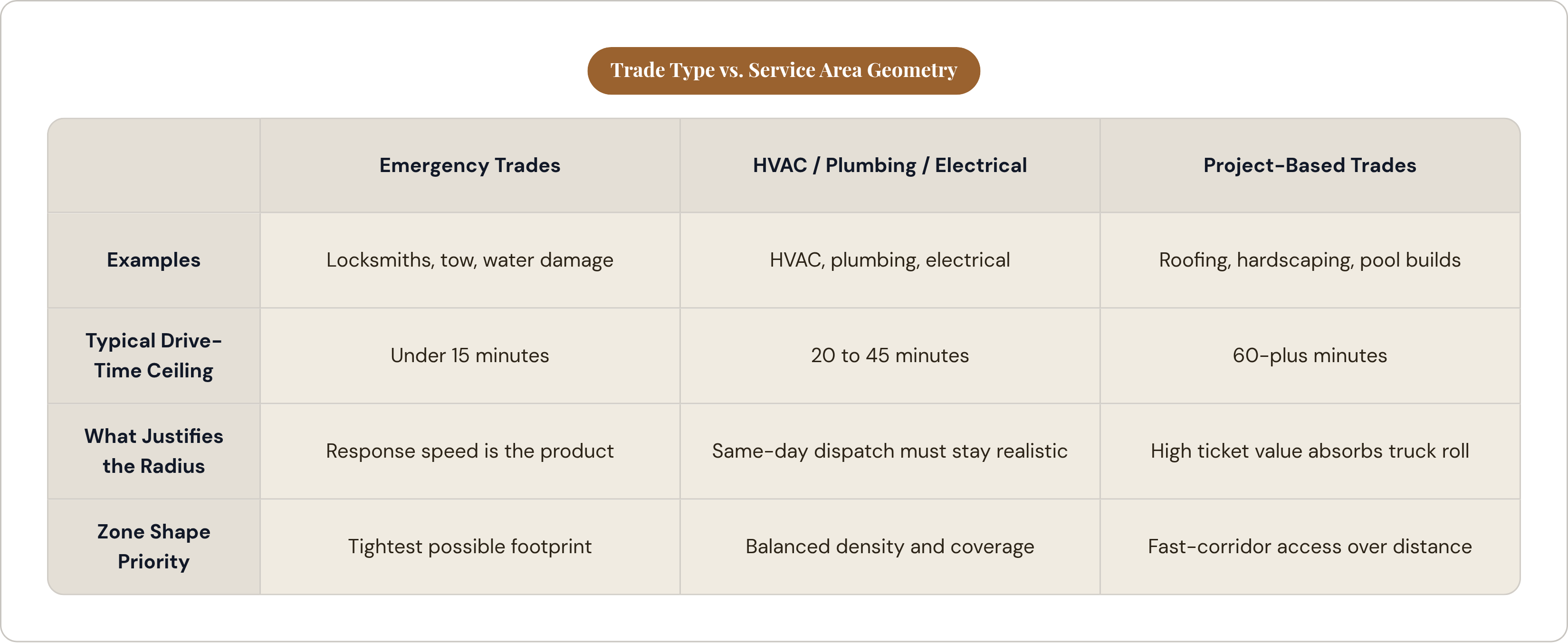
A service area is an operational promise before it's a marketing boundary. It's the zone where your crew can show up, do the work, and get back within a day that still makes money. Drive time is the right unit to measure that in.
Different trades draw this line differently, and for good reason:
- Emergency trades (locksmiths, water damage crews, tow companies) run tight, often under 15 minutes, because response speed is the actual product being sold.
- HVAC, plumbing, and electrical outfits usually plan around 20 to 45 minute corridors, since same-day dispatch has to stay realistic.
- Project-based trades, roofing, pool builds, hardscaping, can stretch past 60 minutes when the job size justifies the truck roll and crew hours.
Hardscaping sits squarely in that last group. A high-ticket patio job can absorb a lot more windshield time than a $300 service call ever could. But that tolerance has a ceiling, and a lot of contractors never find it because they never look.
Here's the geometry problem: real drive-time zones aren't round. They follow roads, and roads don't radiate out evenly from your shop in a nice, even pattern. A circle is a convenient shortcut that pulls in slow, congested routes you shouldn't be servicing and cuts out fast corridors just past the arbitrary line you drew. Routing software and GIS-based service area tools can plot the true shape, the drive-time polygon, grounded in how roads actually connect your shop to a job site. That distinction is the difference between planning around reality and planning around a guess.
How drive time compounds into margin loss on a typical job day
Unbillable drive time is the real leak. Your crew is on the clock, the van is burning gas, and none of it is generating revenue.
Run the math across a week. One extra hour of round-trip driving per job, five jobs a week, and you've quietly handed over a chunk of your labor hours to nothing but transit. Add fuel, wear on the trucks, and the overtime risk that shows up when a "quick job" turns into a long day because of the drive, and the cost stacks higher than most owners realize until they actually track it.
Job density is what fights back against this. When work clusters tightly in one corridor, a crew can stack two or three stops in a day. When it's scattered across the map, you're stuck running single-job days, no matter how skilled the crew is.
The real question is whether a job's location lets you build a profitable day around it, not just whether that one job is profitable on paper. I've watched contractors take jobs at the far edge of their radius over and over, and without meaning to, they end up sending their best crew on the longest drives, which is exactly backwards. If you're regularly wrapping up a job with unused afternoon hours because the drive back is too long to squeeze in another stop, that's a sign the zone is too wide for that particular corridor, not just a scheduling fluke.
Where Google's service area rules constrain the geometry — and what actually drives ranking within it
Google Business Profile doesn't let you target by radius anymore. Service areas have to be named places: cities, towns, zip codes. You get up to 20 of them, and Google recommends staying within roughly two hours of driving time from your verified business address.
Claim too much ground outside that, distant counties, far-flung regions with no real connection to your address, and you're risking a suspended or disabled profile. That's your listing gone.
Here's the part that surprises a lot of owners: according to testing from Sterling Sky, the service areas you select don't directly move your ranking. Review volume and recency are what move it. A contractor who carefully curates all 20 named areas but only has a handful of thin reviews will lose to a competitor with fewer listed areas and 50-plus recent reviews, every time.
The geometry work still matters, for eligibility, for compliance, for staying within Google's rules. But performance inside that zone comes from doing the work, getting the reviews, building local signal. For hardscaping specifically, a finished project with a genuine review tied to a named suburb beats an empty listed service area with zero activity behind it, every time.
How to read your own geography for profitable corridors versus margin drains
Skip the map for a minute and start with your job log. Pull the last 50 to 100 completed jobs. Tag each one with drive time, revenue, and job duration.
Patterns show up fast. Certain zip codes or towns will produce jobs that close well, staff up efficiently, and generate the reviews you actually want. Those are your core corridors. Other jobs will jump out as the opposite: long drives, scheduling headaches, margins that never quite worked. Note where those are too.
A profitable zone almost never looks like a circle. It looks like a handful of corridors radiating out from your base, following whatever roads actually move fast:
- Highways and arterial roads create fast corridors, where 30 minutes covers real ground.
- Surface streets, bridges with rush-hour backups, or rural roads without alternatives create slow corridors, where that same 30 minutes barely gets you anywhere, and unreliably at that.
Layer demand on top of that. Which corridors have the homeowner profile that fits your best work, the home age, the equity, the project scale you actually want to be building? Once you know that, the move is obvious: concentrate marketing and scheduling in the densest, fastest-access corridors. That's what lets you stack jobs, build stronger local review signal, and route crews efficiently. All three feed each other.
What happens to lead quality and local visibility when a contractor deliberately tightens their zone
I've seen this play out directly. One contractor in a Manchester suburb tightened their service area to a denser zone and watched their directory rankings climb across the board within a few months. Density did the work: concentrated jobs built up local review signal faster than a scattered service area ever could.
Fewer jobs, more tightly clustered, build stronger geographic relevance. Google and review platforms notice repeated activity in a defined area; that's simply how the signal accumulates.
Lead quality moves in step with visibility. Prospects inside a tight zone are easier to schedule, get faster responses, and convert better, because you can actually show up when you say you will.
There's a real trade-off here, and it's worth naming plainly: tightening a zone means turning away some inbound leads. You need real confidence that your concentrated zone has enough demand to replace what you're declining. For hardscaping, that confidence usually comes from suburban neighborhoods with homes in the 15 to 40 year range, homeowners investing in their yard instead of moving, and a cluster of past projects already completed nearby. Those are the conditions where tightening pays off.
It doesn't always. A rural or low-density market might genuinely need a wider zone just to keep the schedule full. That's a different market with a different math.
Aligning marketing spend with the zone's actual geometry
Once you've found your real corridors, your marketing should back them, not the old radius you inherited.
Google Local Service Ads should target the specific cities and zip codes inside your productive corridor, not the whole claimed service area. Meta ads with neighborhood-level targeting work well for reaching homeowners in the 35 to 65 range within defined suburbs, which lines up closely with who actually buys hardscaping work.
Cost-per-lead benchmarks give you a sense of what efficient looks like. Landscaping and outdoor work sits toward the lower end of home services CPL, roughly $30 to $45 per search lead. Premium project trades like roofing run $85 to $120, reflecting bigger job values and more competition on the same search terms.
Build local landing pages for your highest-priority cities and suburbs, ones anchored to places where you've actually completed work, not generic service-area filler. Run local SEO and LSAs together rather than treating them as separate lanes: LSAs bring volume into the zone right away while organic search builds underneath it, both pointed at the same geography instead of pulling in different directions.
And once your zone is tight enough, tactics like direct mail or door-knocking start making sense again. Blanketing a specific subdivision right after finishing a project there is a viable move with a tight zone. Try that with a 25-mile radius and pure gut instinct, and you'd never even think to do it.
Operational tools that translate drive-time thinking into daily scheduling decisions
Route optimization software sequences a whole day's jobs to cut total drive time, not just the distance between any two stops. Drive-time polygon tools, built on routing APIs or GIS data, let you see your real 20, 30, or 45-minute zone: the actual road-network shape, not a circle drawn from habit.
Scheduling discipline matters just as much as the software. Book jobs by corridor and day: Monday in the north corridor, Wednesday in the east, instead of accepting work ad hoc and scattering your crew across the whole map by Thursday.
AI-driven lead handling and scheduling now does a version of what used to require a full-time dispatcher: answering an inbound inquiry instantly, checking it against your zone and job type, and slotting it into the right corridor day automatically.
All of this together tells you something important: whether a corridor has slack, room for more jobs, or whether the crew is already maxed out there. That answer should drive how hard you push marketing in that corridor next. And it's tough to see any of this clearly when your CRM, your scheduling tool, and your marketing platform are three separate systems that don't talk to each other. A connected system surfaces the pattern in your own data automatically, instead of leaving you to piece it together by hand.
Deciding when to expand a zone versus when to deepen within it
Slow weeks are not a reason to expand. A dry pipeline is a demand problem or a marketing problem, and stretching your zone to fix it usually spreads your crew thinner and makes things worse.
Expand when your core zone is consistently full, when you're turning down work because there's no capacity left, and when a neighboring corridor shows real demand: the right homeowner demographics, genuine inquiries, competitor projects already happening nearby. Even then, expansion should mean adding a specific corridor, a highway route, an adjacent suburb, not redrawing the whole circle bigger.
Before you expand, test the alternative: does pushing harder in your existing zone, more reviews, more local landing pages, more direct neighborhood outreach, fill the schedule at better margin than chasing new ground would? Often it does. A zone where you've already built strong review density in specific towns is a compounding asset. Expand before that asset matures, and you're giving it up before it ever paid off.
This is where good lead-routing systems earn their keep. When AI agents are qualifying leads by job type and location and slotting them into scheduled corridor days, the pattern of where demand actually clusters, versus where it's just scattered noise, becomes visible in the data. At that point the zone decision is a read of your own pipeline geography, not a gut call, and that's a far better place to make the decision from.